We're opening lovestruck to couples in small groups. Join the waitlist →

Wedding website and planning featuresEverything your guests need. Everything you need to plan it.

The website, RSVPs and invites are on every plan, including Free. Essential adds WhatsApp, guests' photos by QR code, logins for your partner, family or planner, and the seating plan, budget and run sheet. Signature adds every template, the planning board, unlimited guests and events, voice notes, time-capsule letters, a live photo wall and thank-you messages. The full breakdown is on Pricing.

For your guests

Your guests open their link on their phone. Within seconds they know what's happening, when, where, what to wear and how to reply. No accounts, no app to download.

RSVP

The RSVP is the heart of it. Get it right and the rest is easy.

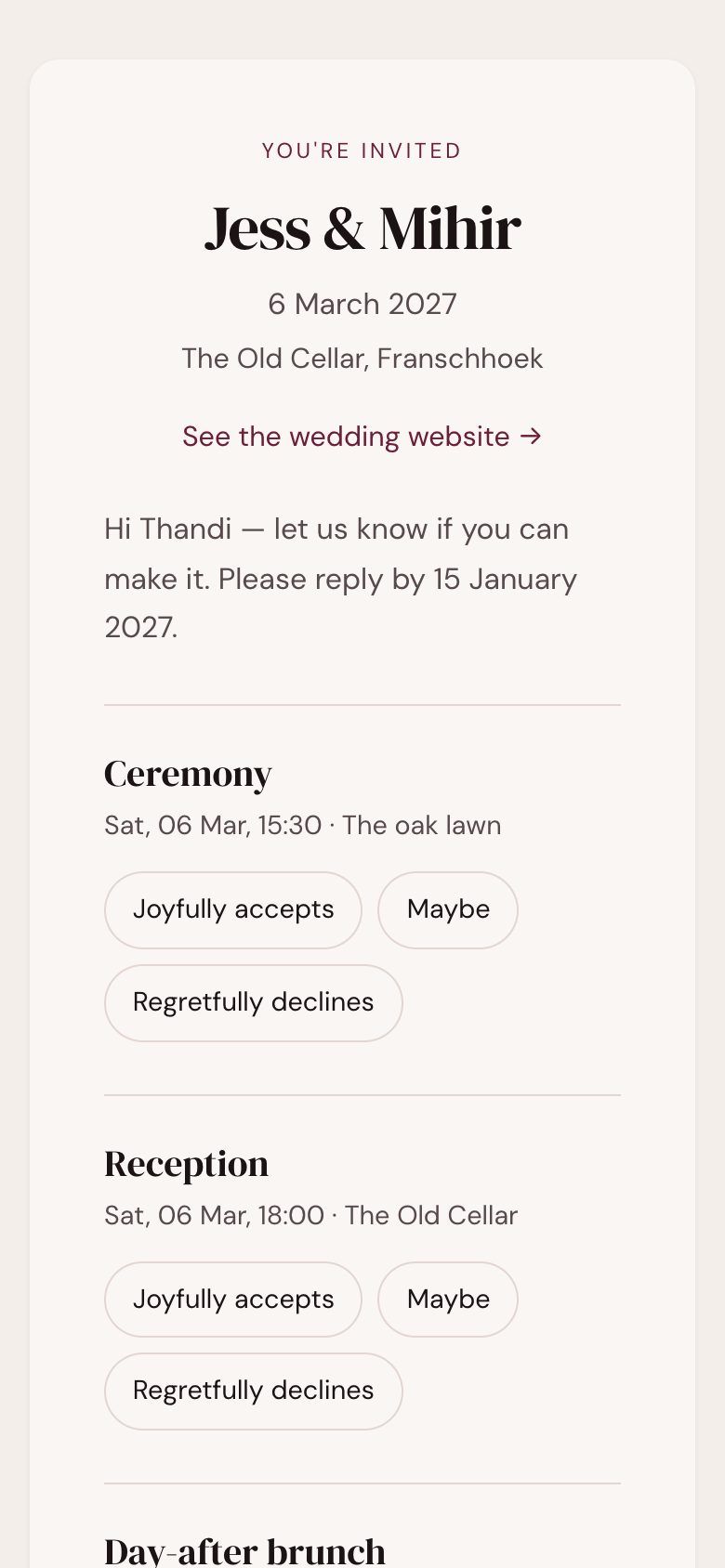
Each guest gets a private link with their name already filled in. They reply to each event they're invited to, tell you what they can't eat, and name their plus-one. You see the totals update as replies come in.

Plus-ones · dietary needs · your own questions · a CSV export of the lot.

A guest's personal page: the couple's names, the date, and a reply for each event they're invited to

A personal page for every guest

Their name, the events they're invited to, their RSVP, and how you'll reach them. One link that works from the save-the-date to the morning after.

Invites on WhatsApp or emailEssential +

Save-the-dates, invitations and reminders on WhatsApp, where your guests actually read things. Email on every plan.

Automatic reminders

Weekly nudges to guests who haven't replied yet: by email on every plan, and by WhatsApp on paid plans. Turn them off any time.

More than one eventEssential +

Kitchen tea, ceremony, reception, Sunday brunch. Invite each guest to the right ones, and they reply to each. Free has one event, Essential two, and Signature as many as you like.

Add to calendar

One tap saves the day to Apple, Google or Outlook, and each guest gets exactly the events they're invited to.

Travel and where to stay

A proper section for out-of-town guests: places to stay with booking codes, how to get there, and a map link for each.

Your story

Most wedding sites stop at "here are the details." That's the boring half. The interesting half is how the two of you got here.

Tell the whole story

Not just one paragraph. How you met, the slow build, the proposal, with a photo to go with it.

Photo gallery

Your photographer's set, your phone shots, the engagement shoot, laid out by your template.

Registry

Link your registries at Yuppiechef, Takealot, @home or anywhere else, and add a cash-gift note with your own banking details. We're never in the middle and never take a cut.

FAQ and your own sections

Dress code, parking, kids, the after-party. Add a section for anything your guests will ask.

An envelope entranceSignature

Your site opens with a wax-sealed envelope, addressed to each guest by name. They tap the seal, the flap lifts and the invitation rises out. Choose the paper colour, an embossed pattern and the wax, on any template.

A live countdown

Days, hours and minutes to the day, at the top of your site.

Schedule changes

Change the schedule, republish, and everyone sees it the next time they open the site.
See every template as a live demo →

Plan it

Behind the website is everything you need to run the wedding. Invite your partner, a parent or your planner to do it with you.

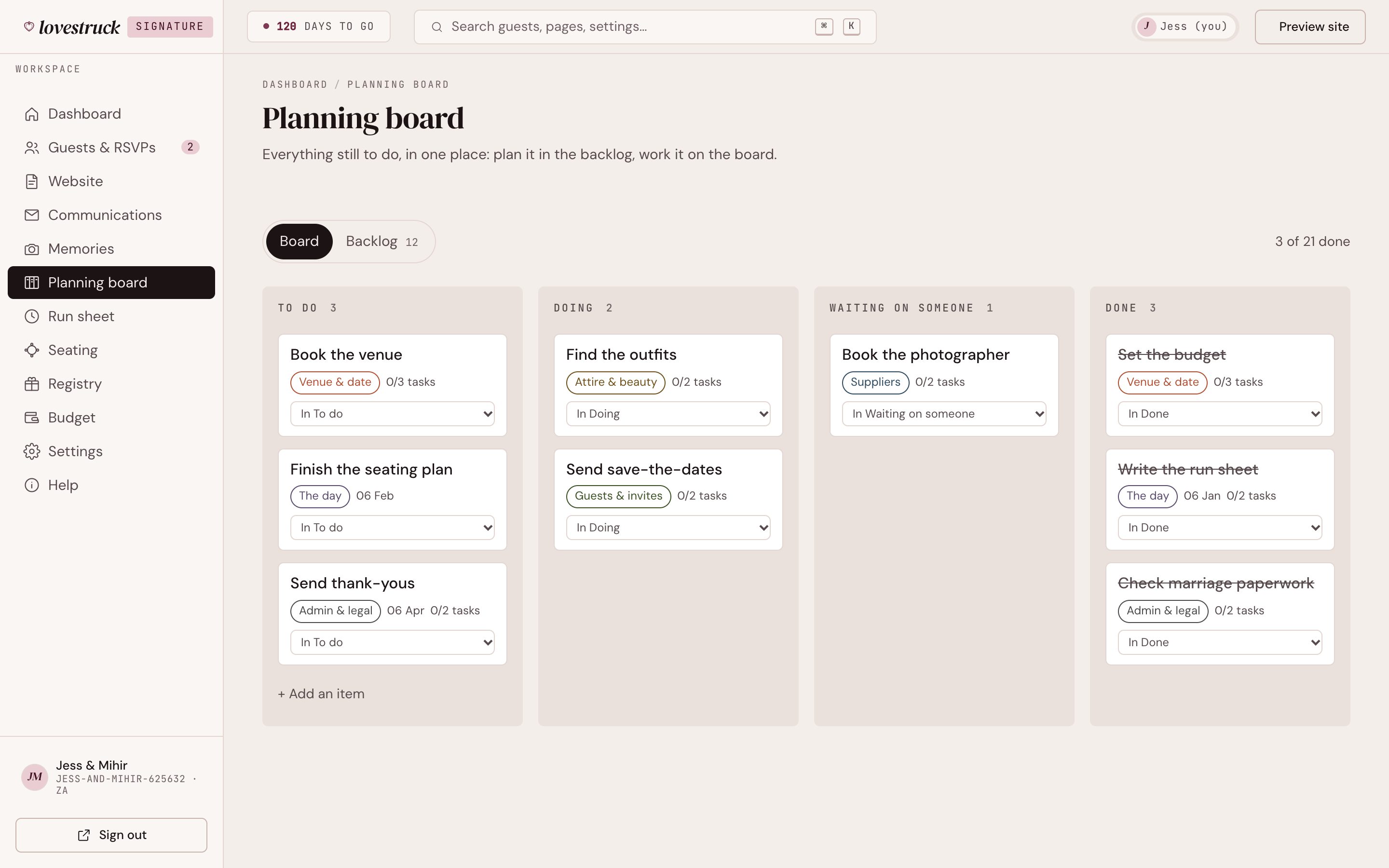
The planning board: categories of wedding to-dos in To do, Doing, Waiting and Done columns

Guest list and households

Everyone you're inviting, grouped the way families actually work, with your own fields for anything else you need to track.

Seating plannerEssential +

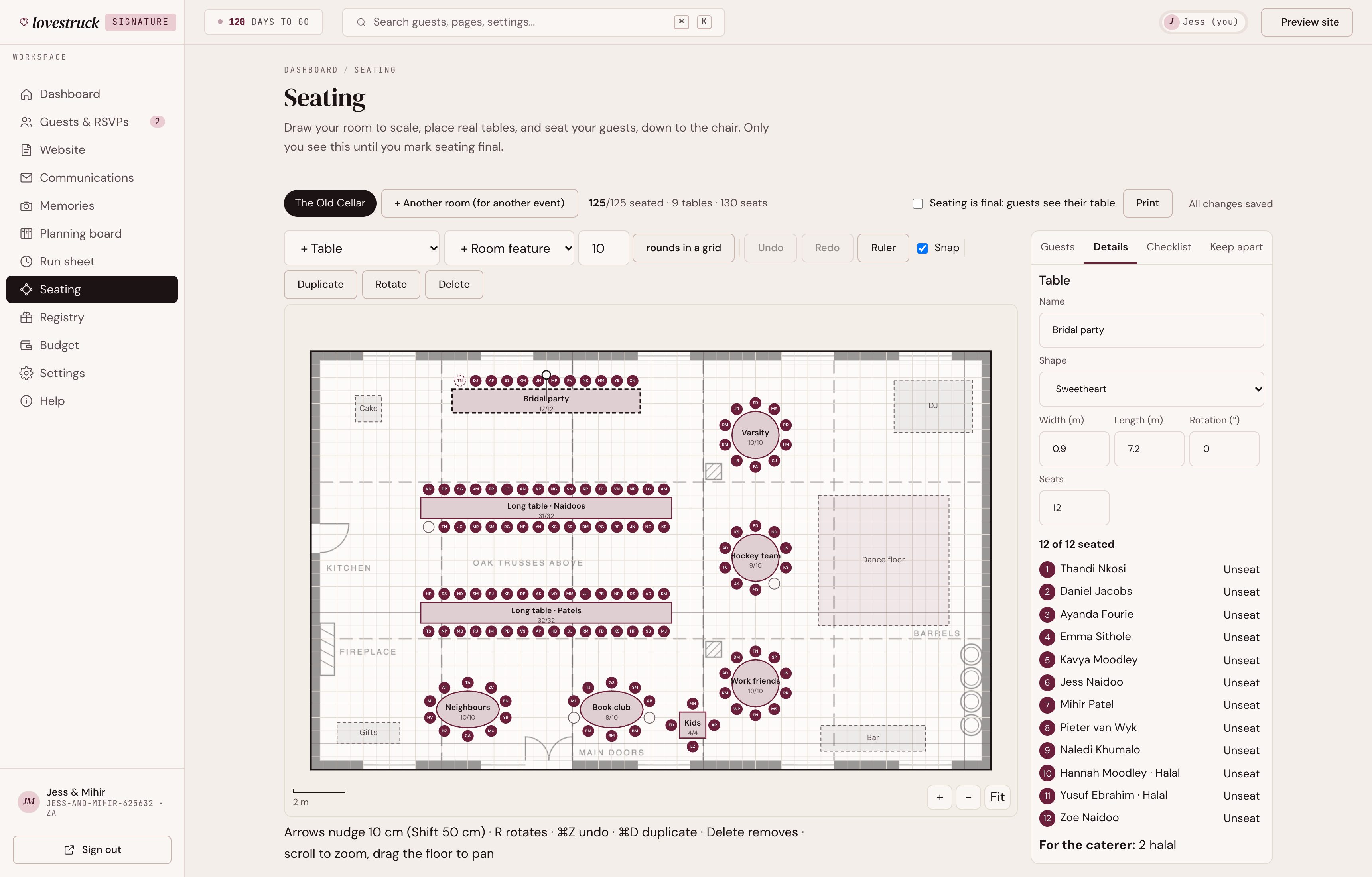
Your room drawn to scale, with real round, trestle and sweetheart tables. Drag guests or whole households onto seats, see who's split up or too close to the band, and print the floor plan, table lists, place cards and the caterer's dietary sheet.

BudgetEssential +

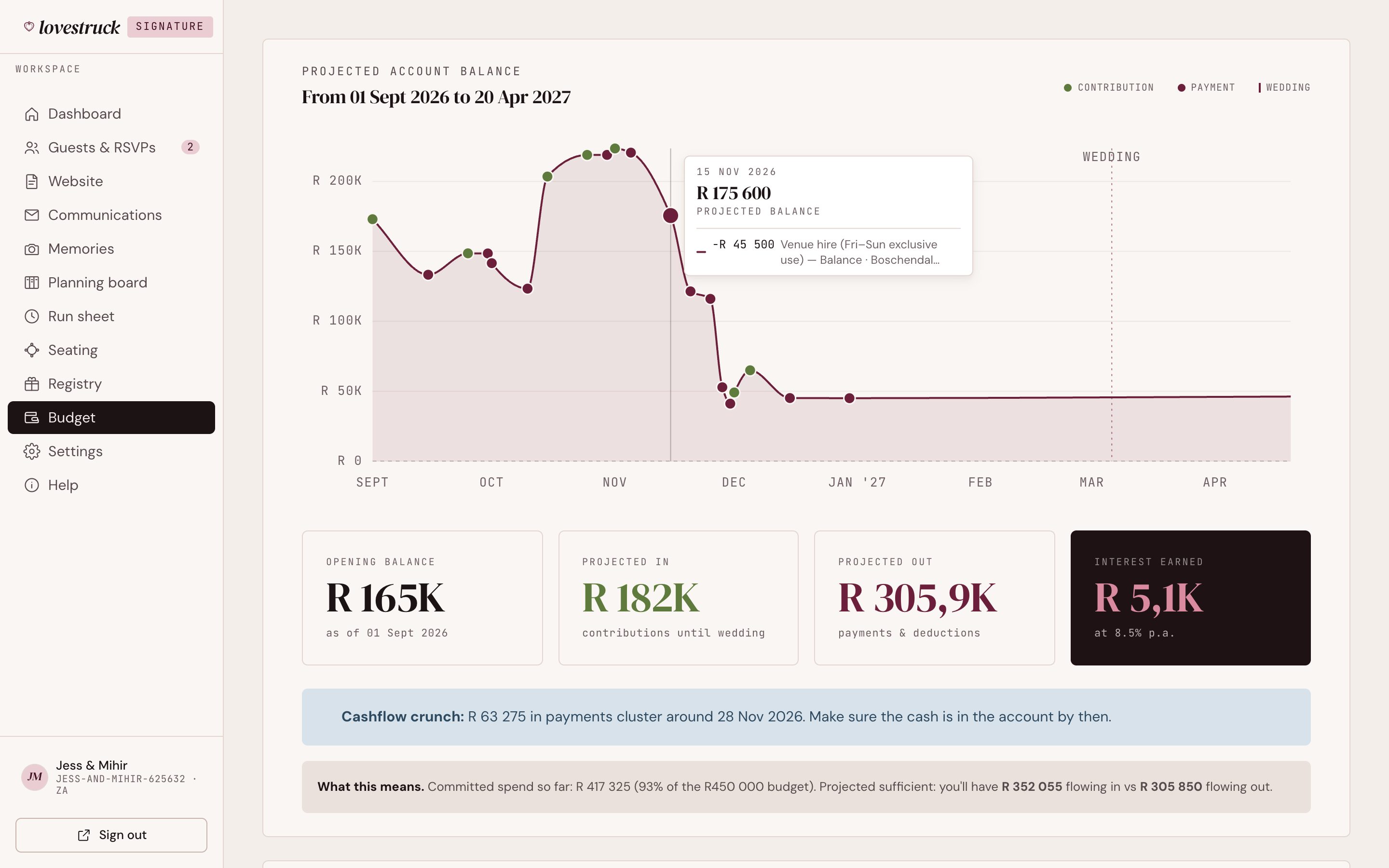
What it costs, who's contributing, what's been paid, and what-if totals before you commit.

Run sheetEssential +

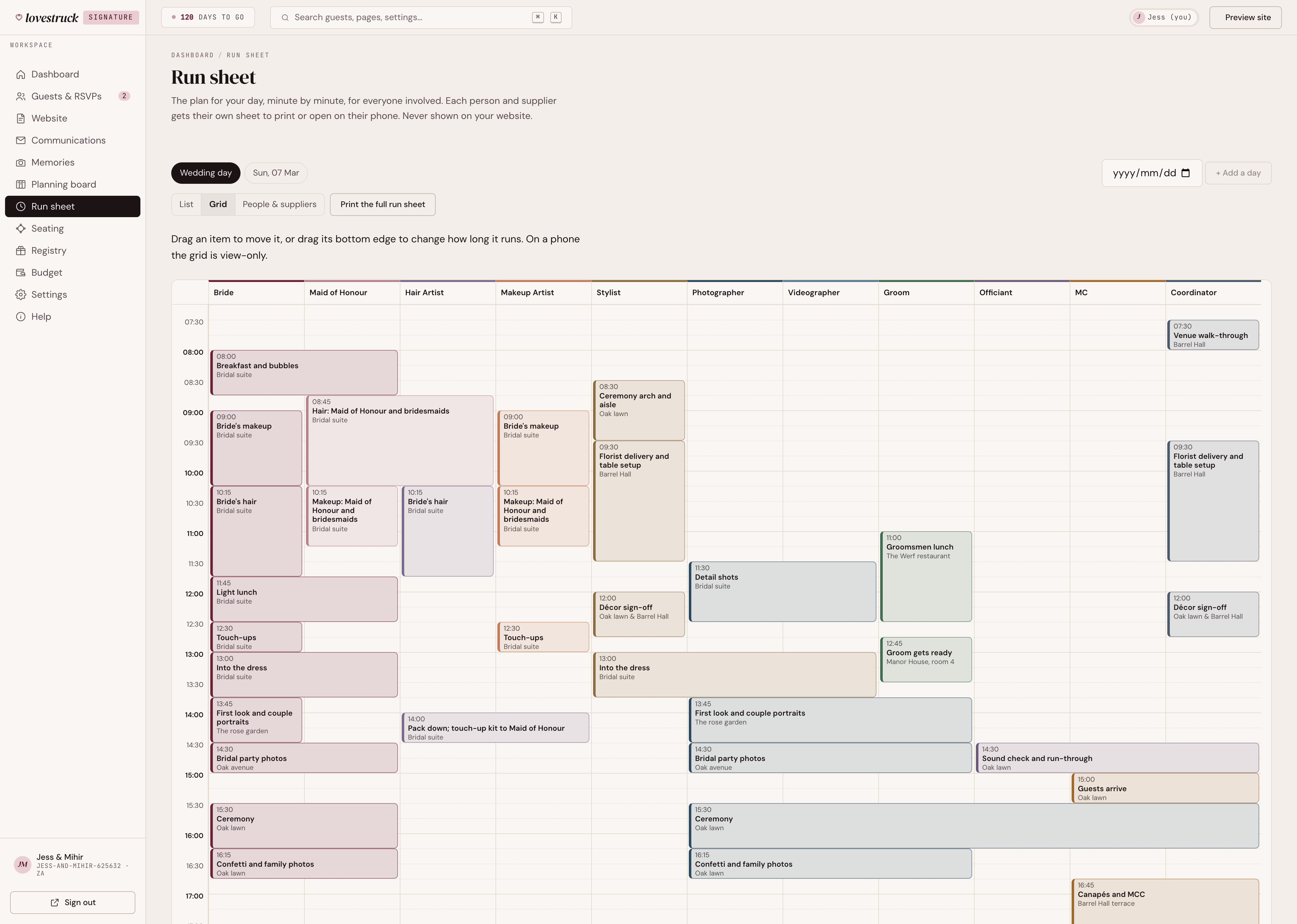
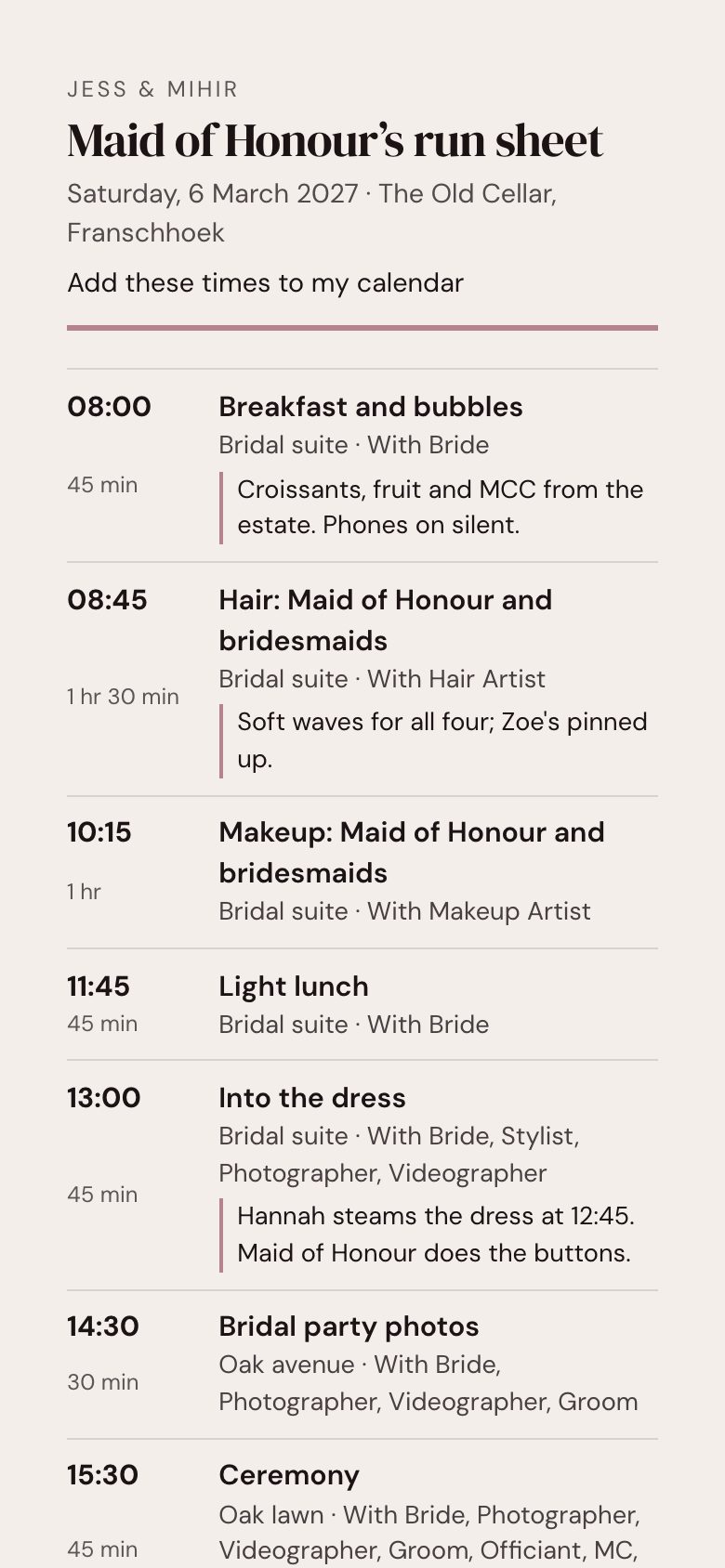
The day minute by minute for everyone involved, as a list or a grid with a column per person. Each supplier gets their own printout and a link to open on their phone, and moving the ceremony moves everything after it.

Planning boardSignature

Everything still to do, in categories, with tasks to tick off. Plan in the backlog, then drag it across the board. Start from our checklist, timed back from your wedding date.

Plan it togetherEssential +

Invite your partner, family or planner, each with their own login and the right level of access.

Share pack

Every guest's personal link, ready to send yourself however you like.

BudgetEssential +

Your balance, projected to the day. No surprises in the last month.

The budget planner's projected balance chart: savings and family contributions coming in, supplier deposits going out, and what's left after the wedding
Run sheetEssential +

One plan for the whole day. A personal sheet for everyone in it.

The run sheet as a grid with a column each for the bride, maid of honour, hair artist, makeup artist, stylist, photographer, videographer, groom, officiant, MC and coordinator
The maid of honour's own run sheet on a phone: breakfast at 08:00, hair at 08:45, makeup at 10:15, with locations, who they're with and notes
SeatingEssential +

Your venue, your tables. Every guest in their seat.

The seating planner over the venue's own floor plan drawing: a long bridal-party table, two family-style banquet tables, round and oval tables and a kids' table around the dance floor, with guests' initials on their seats and the bridal party listed by seat

On the night

Put a QR code on every table. Guests use it to send you photos, voice notes and letters from the night.

Voice notesSignature

Their voices, from the night.

Guests scan the QR code and record a message on their phone. No app, no sign-in. The notes land in your memories in the portal, where you can listen to them and keep them.

Recorded in the browser · named by the guest if they like · kept for as long as you have your site.


Time-capsule lettersSignature

Guests write a note (or record one) and choose which anniversary it opens on, from your first to your fiftieth. We email you the morning they open. Not even you can open one early.

Live photo wallSignature

Put guests' photos on the big screen at your reception as they take them, with your QR code in the corner. Approve them first if you'd rather.

Guests' photos, by QR codeEssential +

Guests add the photos they took straight from their phones. You'll find the shots your photographer missed.

After the day

Most wedding sites die the morning after. Yours doesn't.

Thank-you messagesSignature

See everyone you still need to thank, with a note of what they gave you, and send each a thank-you by email. It keeps track of who you've thanked.

Download everything

One ZIP with your guest list and RSVPs, messages, planning, your site, and every photo and voice note. Yours to keep.

Your site stays liveEssential +

After the wedding, and after your editing window ends, your site stays up for as long as you want it. On Free it stays up until six months after the wedding.

On the way

What we're building next.

None of these are live yet. We'll add them to the plans when they are.

On the way

A second language

Your whole site in English plus Afrikaans, isiZulu or another language, with a switch for guests.

On the way

Song requests

Guests suggest a song when they RSVP. You keep the must-play and do-not-play lists for the DJ.

On the way

Your own domain

Use yourwedding.co.za instead of a lovestruck address.

Want one of these sooner? Tell us.

Begin

Your story already happened. Let's give it a home.

Opening to couples in small groups · Free to start · Pay once if you upgrade